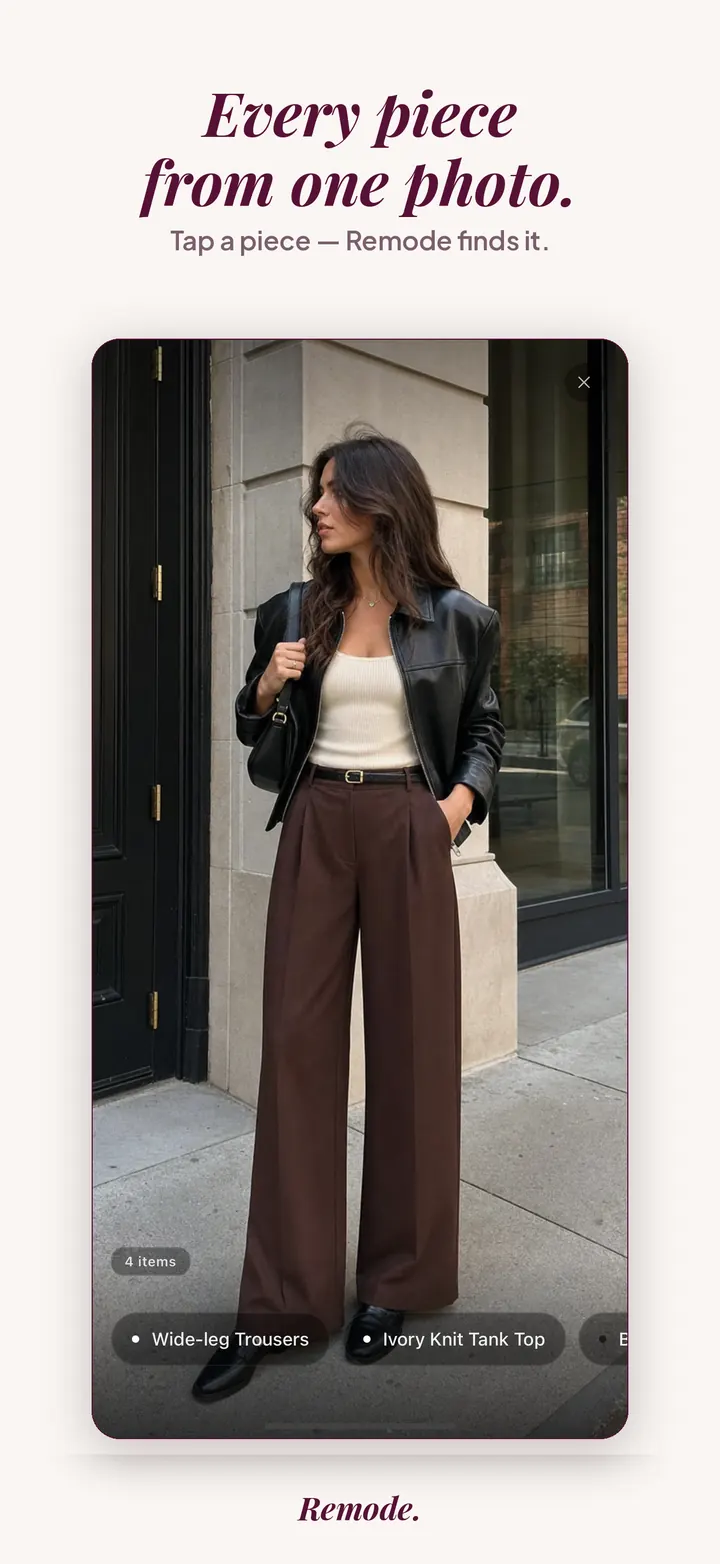
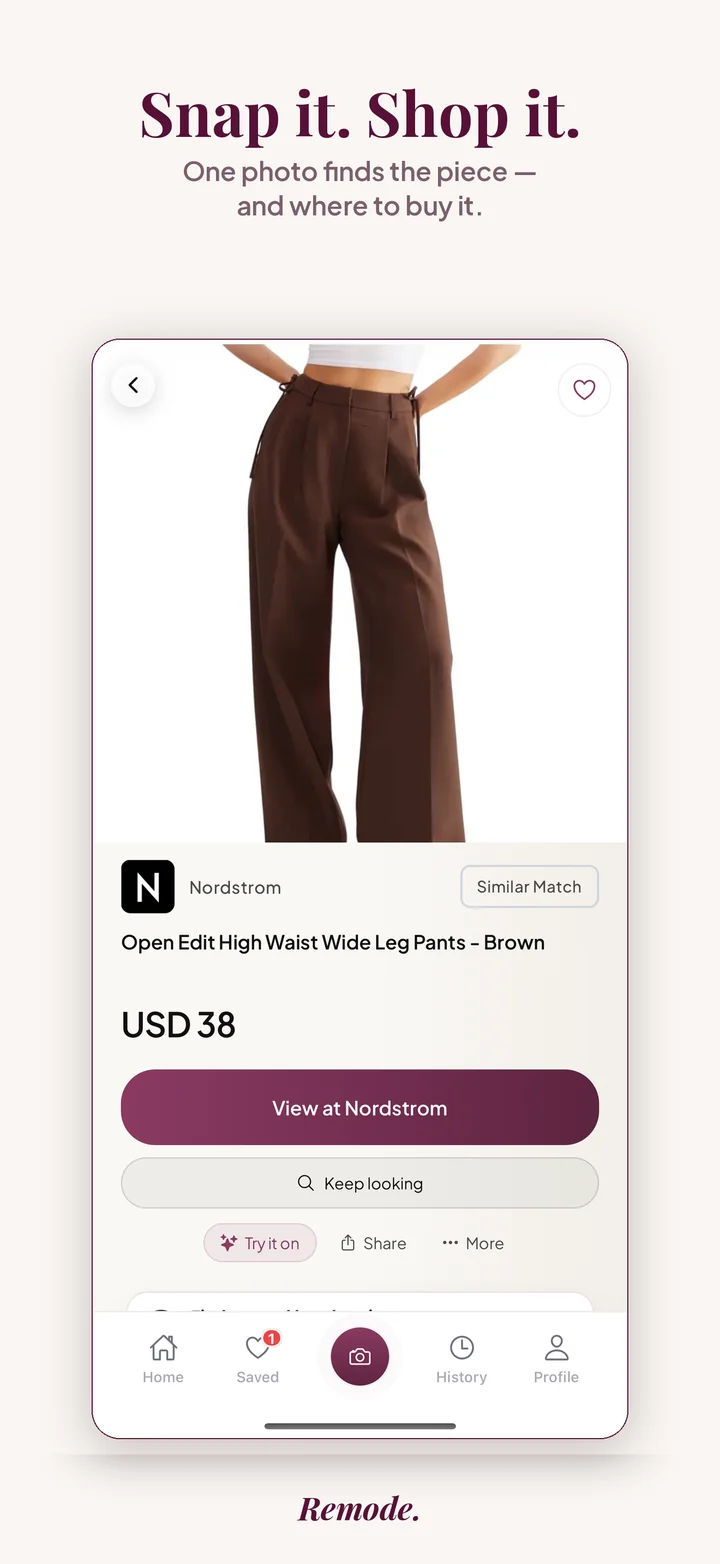
Save a clear screenshot of the Instagram look, upload it to Remode and choose the piece you want. You can find new matches in the free browser search; for pre-loved options, use the iPhone app and check the listings it finds for your country.
Browser photo search, no account needed: new matches. Pre-loved options show up in the iPhone app.
See a real app example
Start with a photo
Find a similar piece
Actual app screens. This result is labeled Similar Match. Prices and availability can change.
Save a screenshot from Instagram. Use the clearest carousel image rather than a compressed repost.
Upload it in Remode’s free browser photo search or iPhone app, and choose one garment, shoe or bag.
Read the match label and compare the details, then check size, price and delivery at the shop. For pre-loved, use the iPhone app; browser results show new matches.
What to know
Instagram images can be filtered, compressed or reposted from an old season. Remode does not access private posts or guarantee every piece of an outfit; use a screenshot when a public link cannot be resolved.
Why an Instagram post hides more than it shows
Instagram is built to make a look feel effortless, and everything that makes it feel that way works against a search. The app re-encodes every upload, so a feed image arrives already softened, and your screenshot copies that softened version. Carousels spread an outfit over several slides; the slide with the face is rarely the slide where the trousers are in focus. Tagged products help when they exist, but many creators tag nothing, tag only a sponsor, or tag a shop whose link now points at a sold-out page. Stories add a clock: once a Story expires, the screenshot in your camera roll is the only copy that remains, complete with the sticker and the poll that were sitting on top of the jacket. Add the square or portrait crop that trims shoes and bags at the edge, and the image you have is a thin slice of the garment. Remode works from that slice, which is why the capture matters.
What the labels tell you about an Instagram find
An exact label on an Instagram search means Remode found a listing with hard evidence that it is the same product, despite the compression; it will not show that label just because a result looks close. Best visual match is the honest answer for many feed screenshots: a listing that resembles the piece strongly, which may be the same design from another season or a different brand's take. Similar gives you alternatives in the same category when the original is out of reach. Creators frequently wear gifted pieces from earlier drops, so a best visual match from the current collection is a normal outcome, not a failure. Before you open a store, hold the result next to the post and check that the colorway matches once you ignore the filter, that the hemline sits where the post shows it, and that the retailer ships to your region at the listed price. Remode places retailer name, price and region-aware routes together so that check takes seconds.
Small moves that help with Instagram screenshots
Prefer the creator's grid post over their Story of the same outfit; grid uploads tend to keep more detail.
Screenshot the slide where the garment is flat and lit evenly, not the slide with the mirror flash.
Skip slides that are heavily color graded; a filter moves the very shade you are trying to match.
Search the top, the bottoms and the shoes as separate pieces instead of hoping the whole look resolves at once.
If the account also posts on Pinterest or a blog, that copy may be larger and cleaner than the Instagram version; the Pinterest guide explains how to use it.
Instagram cases where the search stops short
A post that shows only the back of a coat, or a jacket folded over an arm, gives Remode too little of the piece to be confident, and the honest result will be similar. Archive fashion and runway samples worn by stylists have no retail listing to return. Small labels that sell exclusively through their DMs leave no page to match against. And when a piece exists only on a regional site with no route to you, it will not show up as a store route even if it is the right item. For an ongoing search, start a Hunt in the iPhone app and check its confirmation. A find or alert time is not promised. For Reels, where motion is added to all of the above, the Reels guide covers frame selection, and the screenshot guide explains the general process.
Common questions
What if the Instagram outfit has no brand tag?
Start from the picture rather than a guessed brand. Keep any creator credits separately, upload the clearest carousel slide and choose the jacket or other piece. A tag may refer to a different garment or an older collaboration, so compare the product’s details before treating it as identified.
Can a compressed Instagram screenshot be an Exact match?
Only hard product evidence supports Exact. A sharp pocket, logo or cut can help locate candidates without proving identity. Read Same model as a model-level statement, Best visual match as a lead and Similar as an alternative. None becomes more certain because it costs less.
Which image should I use from a carousel?
Choose the slide with the whole garment facing the camera, especially its hem and fastening. Crop comments and neighboring people without trimming the garment itself. If the post shows several looks, keep the frame for the outfit you mean.
Will the Instagram price include delivery?
The amounts returned are item prices seen during the search. Check the selected shop’s present price, size, payment currency, shipping and import costs. A creator’s country can differ from yours, so verify that the seller delivers to your address.
Can I send the post instead of a screenshot?
Remode in ChatGPT can resolve supported public links. Private accounts, deleted posts and login barriers may prevent that. The browser photo trial accepts an uploaded screenshot without a Remode account; it does not start an ongoing Hunt. The browser trial shows new matches without an account.
Related guides
More Remode guides for visual clothing search, screenshot search, and outfit shopping.
Remode is an independent app and is not affiliated with, endorsed by, or sponsored by Instagram.