Start from the exact item
Search from the product photo, influencer screenshot, or saved outfit.
 Colette & CarrieFashion besties · by RemodeBack to chat
 Price comparison
Use a photo or screenshot as the starting point, then compare similar styles, prices, stores, and second-hand options before buying the first match you see.
Search in your browser. The app is available for iPhone.
Start with a photo
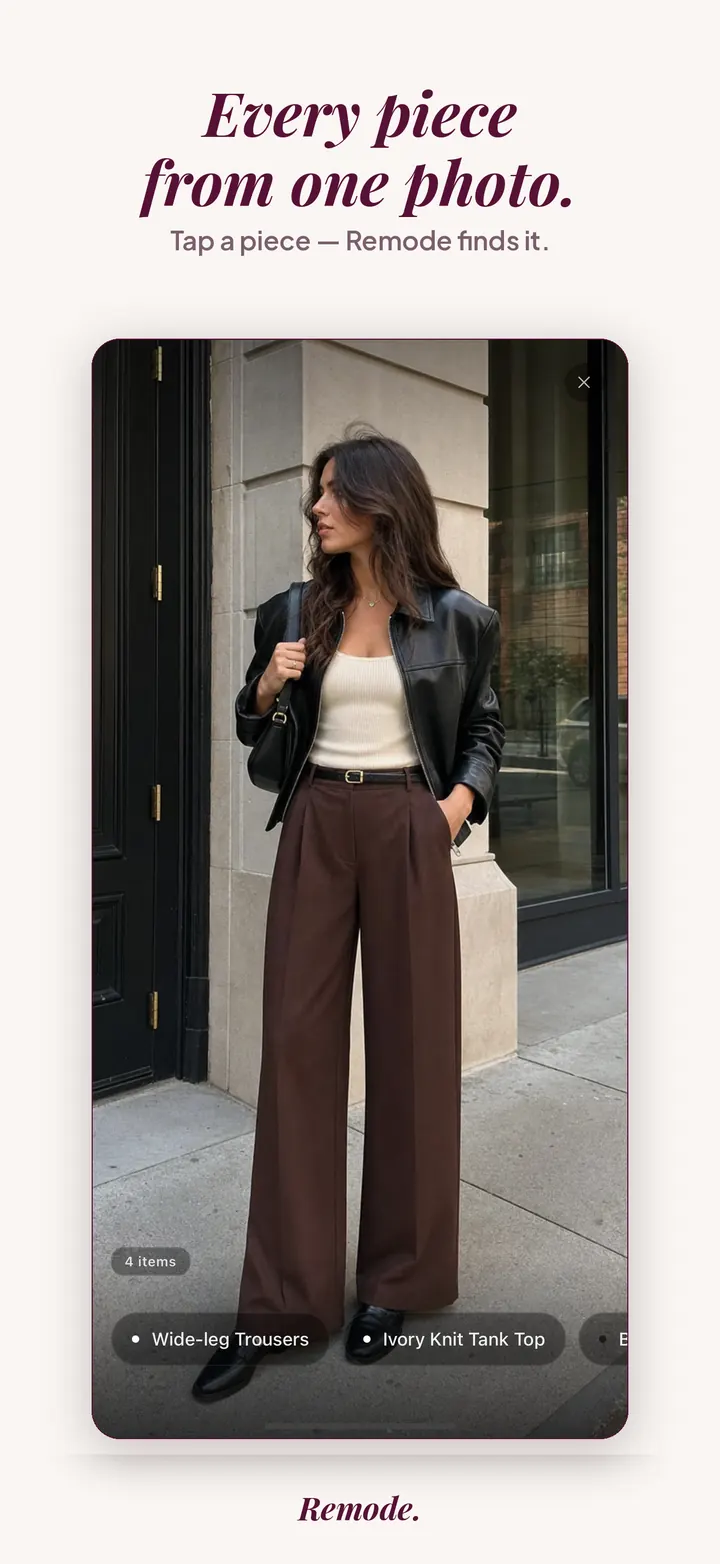
Find a similar piece
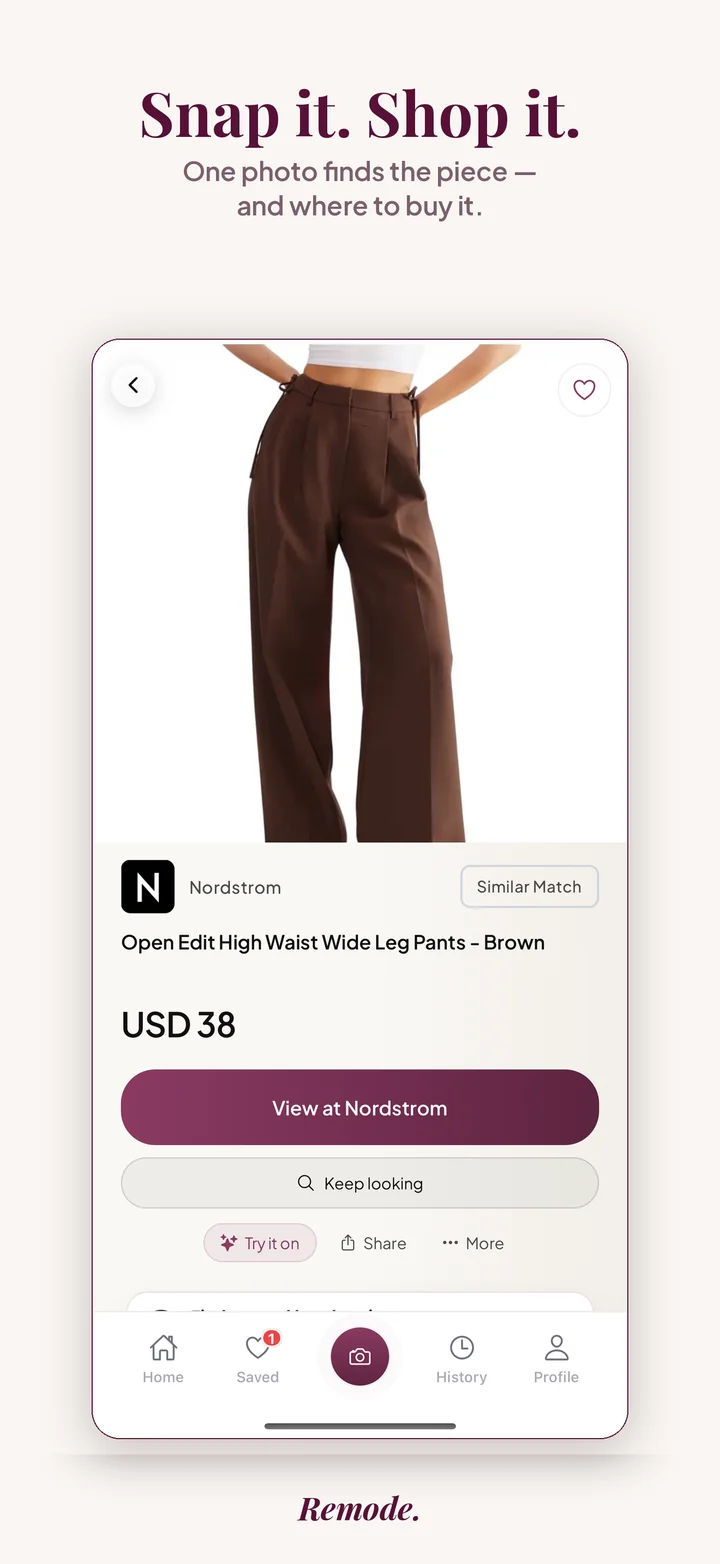
Actual app screens. This result is labeled Similar Match. Prices and availability can change.
Fashion pricing is messy. The same look can appear across multiple retailers and second-hand listings, so the first result is not always the best buy.
Search from the product photo, influencer screenshot, or saved outfit.
Find alternatives that keep the look while changing price, brand, or availability.
When available, Remode surfaces second-hand options so the comparison is not only new retail.
Remode is designed to make the pre-store decision clearer. These signals help you judge whether a result is worth opening.
Is it an exact match, a strong visual match, or a similar alternative?
Compare the listed price with the retailer, shipping, and current availability.
Check similar styles or second-hand when the original is expensive, sold out, or hard to source.
This page is the overview for buying a garment you have already chosen for less. It covers why prices diverge, how to compare the correct variant, and when a Hunt beats an immediate purchase. The neighboring guides each go deeper on one situation.
Read this page first if you are new to price-checking clothes from images. Jump to a spoke when you have a concrete piece in front of you. Second-hand routes have their own cluster starting at second-hand clothing search, and that guide is the right place when condition and seller trust matter as much as price.
A jacket with a single style number can be listed at different prices on the same day, and none of those listings is necessarily wrong. Brands set a recommended price per market, then each retailer decides how closely to follow it. A store in Switzerland prices in CHF and pays Swiss import costs; a store in Germany prices in EUR with German VAT included; a US store shows a pre-tax figure and adds sales tax at checkout. Comparing those figures directly tells you little until you know what each one includes.
Shipping and returns move the total again. A lower sticker price with paid shipping and a restocking fee can end up above a higher sticker with free delivery and free returns. Duty on cross-border parcels is often invoiced by the carrier after delivery, so it never appears on the product page you compared.
Outlet and mainline lines complicate things further. Many brands produce outlet-only versions of a design with cheaper fabric or simplified hardware, sold under a similar name and photographed in the same way. A photo search will often surface both, and sometimes only the price hints at which version you are looking at.
Colorways are priced independently. A seasonal color is frequently discounted before the core black or navy version, so the same coat in a different shade can be a real saving rather than a fake one. Sale timing differs per retailer too: a store starts its mid-season markdown while another holds full price for weeks, and the gap closes once both are on sale. Add currency swings between the day a store set its price and the day you look, and a spread between stores is the normal state, not an anomaly.
The label tells you which comparison you are making. With an exact result, you are comparing sellers of the same product, and the only variables are price, region, shipping and condition. With best visual match, Remode has found a listing that comes very close but is not confident it is identical, so treat that price as a reference point, not an alternative. With similar, you are looking at a lookalike, and a lower number there is not a discount on the original.
Within exact results, check the retailer name against what you expect for the brand. Official stores, department stores and marketplaces sit side by side, and marketplaces may show third-party sellers whose stock, sizing and return handling differ from the brand's own shop. Check the region tag next: Remode routes you to stores that ship to you, but a store in another currency still charges in that currency, and your bank sets the conversion.
Remode shows the price as it stood when the check ran. Retailers change prices without notice, and a figure can move between the moment you read it and the moment you open the store. Treat the list as a map of who sells the piece and roughly where each sits, then confirm the live number on the product page.
Ranking is never shaped by commercial terms. Some links are affiliate links, and as an Amazon Associate Remode earns from qualifying purchases, but that does not change the order you see.
Some pieces have a single seller, and no comparison exists. Vintage one-offs, custom tailoring, and items from small labels that sell only through their own site or in person will return similar results at most, and a cheaper lookalike is a different product. Heavily edited or filtered images shift the color enough to pull in the wrong colorway, and pricing the wrong variant is worse than not pricing at all.
Prices Remode shows are a snapshot from the check. A flash sale can end before you open the store, and a marketplace listing can be bought by someone else. Duty, sales tax and card conversion fees are decided by the carrier, the state and your bank, not by the retailer page, so the landed cost is something you finish calculating yourself. When no exact result appears, start a Hunt: a piece that is not listed today can be listed tomorrow, and the alert will find you.
Yes. Remode is useful for comparing visually similar items and prices across retailers.
Yes, where second-hand options are available for the item or style.
No. It works for everyday pieces too, especially when you have a screenshot but not the product link.
Prices are set per market. VAT, import duty, local demand and currency all differ, so the same style number can cost less abroad. Before ordering, add shipping, possible duty invoiced on delivery, and the return cost if the size is wrong. The gap often shrinks once those are included.
Usually not. Many brands make outlet-specific pieces with different fabric, lining or hardware and sell them under a similar name. Remode only labels a result exact when it is confident it is the same product; a lower price on an outlet piece belongs to a different garment, even if the photo looks close.
Looking is free until Remode finds you something real, for up to three pieces at a time. Saving a piece lets Remode hunt in the background for price drops, second-hand options and restocks, and hunting does not count as a search. A free account keeps its daily full-featured searches for new pieces, and your Hunts keep reporting regardless.
More Remode guides for visual clothing search, screenshot search, and outfit shopping.
Use Remode to check matches, alternatives, and second-hand options from one photo.