Start with any outfit image
Upload the item from a screenshot, photo, or saved inspiration.
 Colette & CarrieFashion besties · by RemodeBack to chat
 Virtual try-on
Remode connects visual clothing search with virtual try-on, so a promising result becomes easier to judge before you buy.
Search in your browser. The app is available for iPhone.
Start with a photo
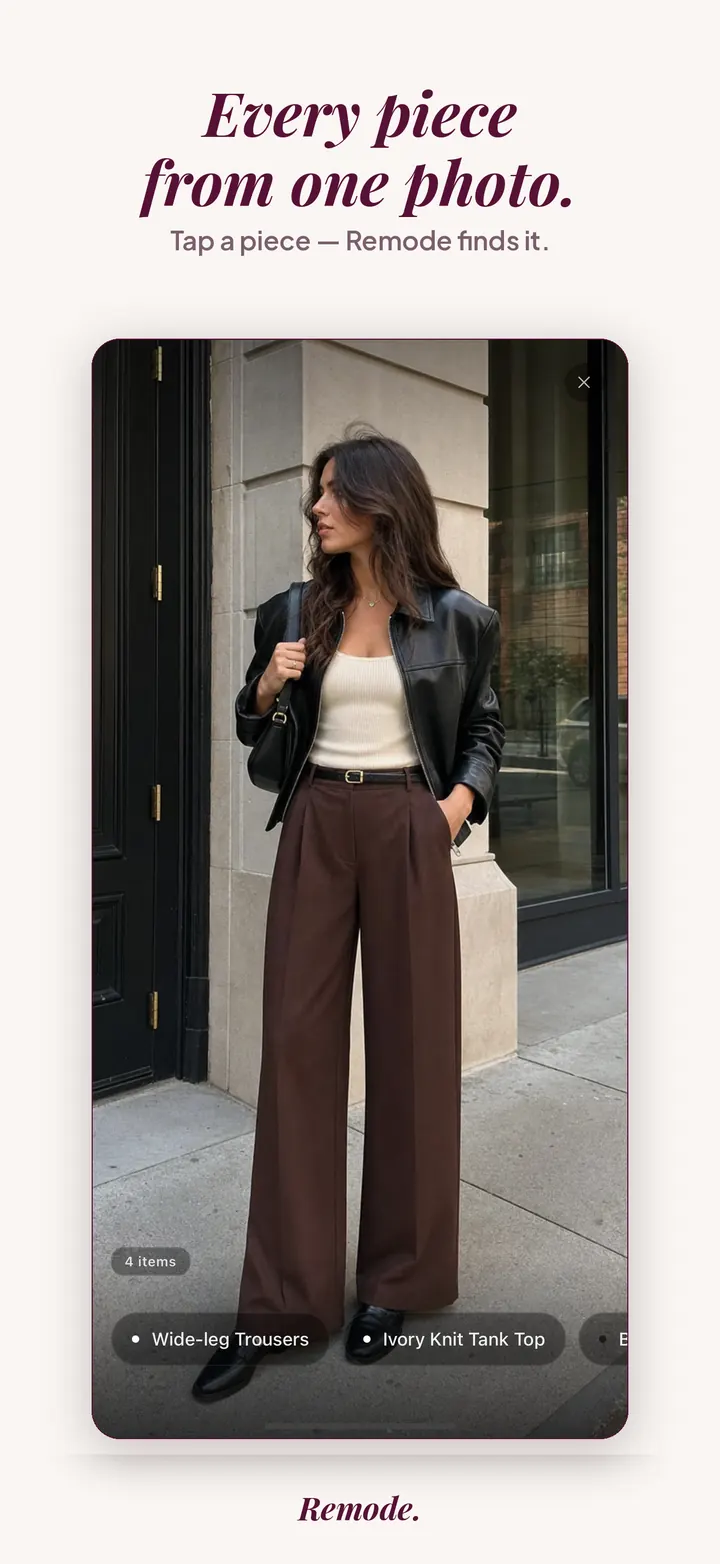
Find a similar piece
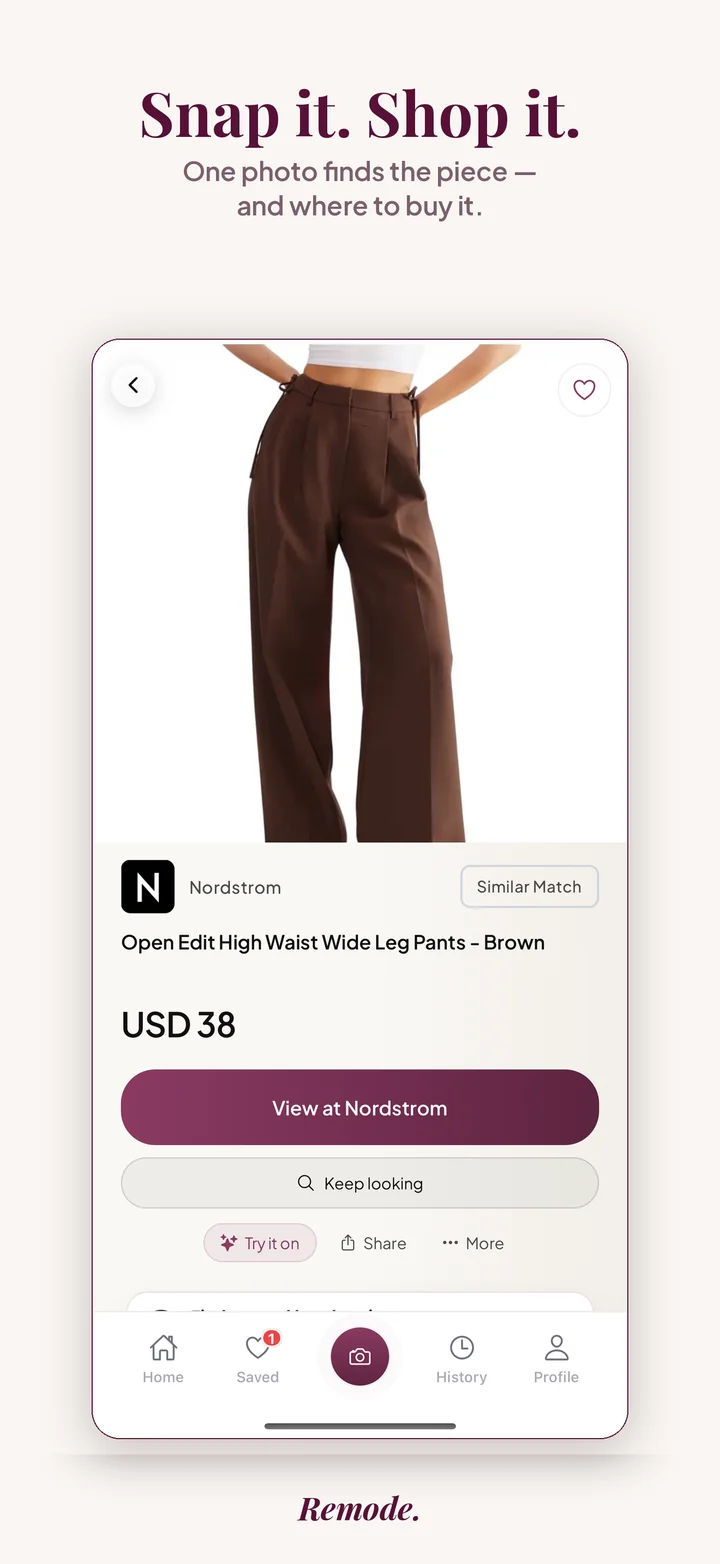
Actual app screens. This result is labeled Similar Match. Prices and availability can change.
A match can look right in a product photo and still be hard to imagine on you. Virtual try-on adds a fast visual check before the store visit.
Upload the item from a screenshot, photo, or saved inspiration.
Pick the clothing result you want to judge more closely.
Use try-on as a final visual signal before saving, comparing, or visiting the retailer.
Remode is designed to make the pre-store decision clearer. These signals help you judge whether a result is worth opening.
Is it an exact match, a strong visual match, or a similar alternative?
Compare the listed price with the retailer, shipping, and current availability.
Check similar styles or second-hand when the original is expensive, sold out, or hard to source.
Try-on is the final link in a chain, and this page covers only that link. The chain begins with a picture of a piece you want, continues with a comparison of who sells it and for how much, and ends with a decision to buy, to wait or to walk away. The virtual preview belongs to that last decision. It answers whether the piece looks right on you, once you already know it is the right piece and what it costs where.
The earlier links have their own guides. Finding clothes by photo covers the search: how a screenshot or a camera-roll image becomes a detected piece, and how the labels exact, best visual match and similar tell you what kind of result you are holding. Read it before this page if you have not run a search yet, because a preview of the wrong product is a preview of nothing. Finding cheaper clothes takes over after the match is settled: currencies, shipping regions, second-hand listings and a background Hunt (looking is free until Remode finds you something real) that reports price drops and restocks. It is the guide for the moment when the piece is confirmed and the question turns to money.
Further guides sharpen single points. Finding the exact clothing match explains what has to line up before Remode calls a result exact, which matters here because a preview is only informative when the garment in it is the garment you will order. Second-hand clothing search is for the case where the preview convinces you and the new price does not.
Stay on this page if a candidate result is already in front of you and you want to know what the preview can settle, what it leaves open, and how to read it before the store tab opens.
A retailer photo is a controlled document. The model was chosen for the sample size, the garment was steamed and pinned at the back, the light was set to flatter the fabric, and the pose hides whatever the cut does badly. What you learn from it is how the piece looks on the body it was designed around. What you want to know is how it will look on yours: where a hem lands, how a boxy shoulder reads on a narrower frame, whether an oversized knit swallows you or sits as intended.
Screenshots make the guess harder. The piece you kept from a Reel or a Pinterest board is worn by someone whose proportions you do not know, in a frame that may be stretched, filtered or cut off at the waist. You are trying to transfer a look from a stranger to yourself with no reference for scale, and the store page will not supply one.
Remode's Try-on exists for that gap. On supported items you can see the piece on yourself before spending, working from the result you picked in the search. It is included while your free searches last, and Remode Hunt adds more; either way it comes after the search, not instead of it. The preview does not measure you and does not stand in for the retailer's size chart. What it does is turn a line with a price and a store name into a picture of you wearing the thing, and that picture is often what decides whether the store tab gets opened at all.
Ask the preview a narrow question: does this piece, in this color, at this length, look like something you would wear. It is good at proportion and palette. A midi skirt that stops at an awkward point, a jacket whose cropped hem sits above your waistband, a shade of green that argues with your complexion: these show in a preview and hide in a flat product photo.
It is not a fit report. A preview cannot tell you that a size M pulls across the back, that the sleeve is short for your arm, or that the fabric has no give. Sizing still comes from the retailer. Read the size chart, the fabric composition and the returns policy on the store page as if the preview did not exist. The preview only tells you whether those pages are worth reading.
Read the preview together with the label. On an exact result, what you see is the product you would receive, so a preview you like is a reason to move on to price. On a best visual match, the preview shows the closest listing Remode could find without being confident it is the same product; like the look if you like it, but confirm the piece before ordering. On a similar result you are previewing a substitute, and the question becomes whether the substitute is good enough on its own terms.
Before the store, compare what the preview does not show. The price next to the retailer name. The region-aware route, since the stores listed are the ones that ship to you. Second-hand listings where they exist, which can make a piece you liked in the preview affordable. And the colorway, because a preview of the camel version says nothing about the black one.
Try-on is not offered on every result. It works on supported items, and where a piece is not supported the option is absent; some categories and some listings sit outside its coverage. If the preview is missing, judge the piece on the listing, the label and the store route, exactly as you would in a search without it.
It is not limited to Remode Hunt. Free accounts can use it while their free searches last, alongside the full search, the labels, saved items, free looking until your first real find and second-hand options; Remode Hunt adds more searches and try-on, up to the fair-use limit. Remode Hunt costs the price shown in the App Store in your currency, it is billed by Apple, and you can cancel any time in iOS Settings.
And it cannot rescue a poor match. When the search returns only similar results, the preview shows you an alternative, not the piece from your screenshot. When the item is a one-off, a vintage find or a garment from a label with no online listing, there is nothing to preview. In those cases save the piece and let the Hunt report a second-hand listing or a restock, or take the similar results as a shortlist and preview those on their own merits.
Yes. Remode includes a try-on flow for supported clothing results.
No. It is a visual preview. Always check size charts, product details, and return policies before buying.
Yes. Search first, then try selected results on when try-on is available.
No. The preview shows proportion and color on you, not how a specific size will fit. Size, fabric stretch and the returns window come from the retailer's product page, so read the size chart there before ordering. The preview helps you decide whether that step is worth taking for this piece.
Yes, on supported items, while your free searches last. The free tier includes daily full-featured searches with an account, every detected piece, the exact, best visual match and similar labels, saved items, free looking for price drops and restocks until your first real find, and second-hand options. Remode Hunt adds more searches and try-on, up to a fair-use limit of 400 per month.
Try-on works on supported items, and support is decided per result, not by where your image came from. A TikTok screenshot can lead to a preview just as a retailer image can, provided the matched piece is supported. When the option is absent, judge the piece by its label, price and store route, and save it if you are undecided.
More Remode guides for visual clothing search, screenshot search, and outfit shopping.
Use Remode to move from inspiration to a result you can judge visually.